Saturday, November 23, 2013

New Job

Okay, some updates on life. After finishing my Master's at UofT, I had some vacation time, went back home to see family, and had some R&R at home in September. That was a really good break from everything; I read some books, played some video games, and just took a break from Maya and all that. I think it was the right decision, although it does feel pretty slow getting back into being creative and doing personal projects. Partly that is the adjustment to working full-time, which brings me, in this blog post, to the job I'm doing now.

I'm employed as a Research Associate (which feels like a bigger more important title than I deserve, but I'm eager to grow into it) at the Science Visualization Group at the University of Toronto Mississauga. There's just a few people in the "group" and we are starting out on a three year project that will involve creating, testing, and disseminating new visualization strategies for addressing common misconceptions in molecular biology undergraduate students.

It's a really great opportunity, because I get to be involved at every level of the research process. We're in the process of creating a simple wordpress site that will serve to share updates on our ongoing research, so I'll share that in the near future and also will probably link to pieces from time to time that I'm involved in.

Sorry, this will be lots of text again and no pictures... maybe I can find a TL;DR photo. Oh no, wait; I do have an image of me at work.

Am I doing Movember at this point? Hard to tell... but you can donate something if you feel so inclined here: mobro.co/stwert

So, one of the awesome parts of starting on this project was I got to put together an amazing computer for doing intensive Maya simulations and things. Not to brag, but I basically got to choose every component I wanted (within a budget of course). So some of the specs are:

  • i7 3790k (six core 3.4GHz CPU designed for overclocking, which I need to try out at some point)
  • 32 GB DDR3 RAM
  • 256 GB SSD
  • 3 TB HDD plus 3 TB external backup
  • One of the biggest cases on the market so it's super cool and quiet. It doesn't look that big in this photo, but everybody that sees it in person is slightly amazed; you can look up Corsair 900D
  • Logitech G710+ mechanical keyboard which is a noisy joy to type on (sorry Andrea)
  • Logitech Performance MX mouse which is almost, but not quite as good as my MX Revolution at home (why discontinue it Logitech‽ <- interrobang="" li="">
  • ATH-M50 headphones which sound amazing but hurt the top of my head. Might need to mod them: http://www.head-fi.org/t/553303/ath-m50-cush-x2-mod-for-incredible-comfort-and-sound-5megapixel-photos (they're attached to the AUNE DAC I brought from home)
  • Two monitors 1920x1080 and 1920x1200... only problem is one is 27" and one 24" so the pixels are quite different sizes and it creates a weird visual thing when I drag windows from one to the other (one monitor is turned around and attached to another computer in the above photo because we're doing eyetracking testing on some existing animation)
  • And a huge steel-series mousepad which makes the mouse butter smooth :)
  • Oh yeah, how could I forget my first ever Quadro video card, the K4000, which is supposed to be excellent for Maya and other intensive computer work
So you can tell I'm pretty excited about all that hardware.

And, what else is there to say? Not too much, but I'm reading another book on Typography and I'm hoping to start some fun creative projects now. I've got a huge long list of ideas and it's time to stop doing so much planning and start doing so much doing.

Hope you're having a great weekend!

Later,
Stuart

PS TL;DR photo


Tuesday, November 5, 2013

Interview with SimplyMaya

I had the privilege of doing an interview for SimplyMaya, a forum I have been a member of for quite a few years. I've also done a few tutorial reviews for them in the past. This time they had a number of questions for me regarding the BMC program and what it is like studying for scientific visualization. Check out the article here:


More updates on my work and my fancy computer and convocation coming soon!
Later,
Stuart

Saturday, October 26, 2013

Breaking the silence

Phew! Made a post. Feels good. See you soon.
Later,
Stuart

PS Since I started my blog, I haven't gone more than a few weeks without posting, and now a few months goes by! I haven't forgotten, but somehow the gaping lapse creates anxiety for posting, so this post is just to get that over with.

Saturday, July 27, 2013

Updated Demo Reel

I've just uploaded an updated and revised demo reel including some of the better shots from my master's project. Hope you enjoy it. Thanks again to PowersWithin for the fun music.


Later,
Stuart

Friday, July 12, 2013

Recording the Illuminated Neuron - Final Project

My Master's Research Project and indeed the BMC program has come to a conclusion. Without further ado, you can check out the full project here: http://bmc1.erin.utoronto.ca/~stuart/RIN/

Please watch the animation, (direct link: https://vimeo.com/70039214) and if you can spare a little more time, feel free to play with the simulator too. I don't expect non-biologists or neuroscientists to understand most or all of it, but hopefully the visuals and interactivity are interesting.

Here's a couple of stills from the animation at very large resolutions. Feel free to download and use as wallpapers etc. (Edit: Okay, blogger apparently has a max res of 1600 on the long edge. Send me an email if you want a larger version... up to 4K).


Now I get to acknowledge everyone like an Oscar speech!
Thanks to Nick, Yves, and Michael (my committee), to all the BMC faculty, my 13 BMC colleagues (very good friends all), members of Yves' lab, my non-BMC friends, all you people that read this blog, and of course my family and Rebecca and God.

Woohoo! Done! What's next? Looking forward to a conference next week that I'm presenting a poster at. I do have some job leads and there is industry day at the end of the month. I'll keep you posted. This blog isn't going anywhere; it's been a terrific outlet for me these past ~4 years and it will continue to be that.

Thanks again everyone, and I hope you continue to check in here and see what the next stage will bring.

Later,
Stuart

A lyrical tribute to BMC

Okay, I'll post up some materials from my MRP shortly, cause I'm done! But first I wanted to just put some lyrics on the page, cause why not.
Presenting: "A Tribute to BMC" to the tune of Paul Simon's Kodachrome (YouTube below, if you're not in the know, and if you are, you can still hit play and sing along). //comments (not lyrics) prefaced with double slashes.

A Tribute to BMC

When I think back on all the stuff I learned in grad school  //*ahem* stuff
It's a wonder I can think at all
And though my lack of fine art knowledge
Hasn't hurt me none
I critique the paintings on the wall

Bee Em Cee-ee-ee  //This is phonetic
You give us those nice bright colors
You give us the research methods
Makes you draw everyone's anatomy, oh yeah  //Provided they stand still
I got a Mac computer  //I don't, I have an ASUS, Corsair, Lian Li, Intel, Windows PC
I love to use the Photoshop
So summer, don't take my BMC away  //Or do, this is just a song

If you took all the art I made
When I was younger
And some of it looks decent, don't you think?  //Operative word: some
I know they'd never match
My sweet communications
And everything looks great in pen and ink  //Hyperbole

BMC  //This sounds the same as the phonetic spelling above
You give us that final gather  //Ambient occlusion would've been great, but... syllables
You give us the verts of Maya
Makes you put particles in all your shots, oh yeah
I got Adobe software  //A lot.
I love to break the picture plane
So summer, don't take my BMC away

Summer, don't take my BMC away (x3)

Summer, don't take my BMC //Sing it out!
Summer, don't take my BMC
Summer, don't take my BMC away

Summer, don't take my BMC
Got to find a job, you see
Summer don't take my BMC away

Summer, don't take my BMC
Summer, don't take my BMC away


Wednesday, June 12, 2013

RIN - Neural environments

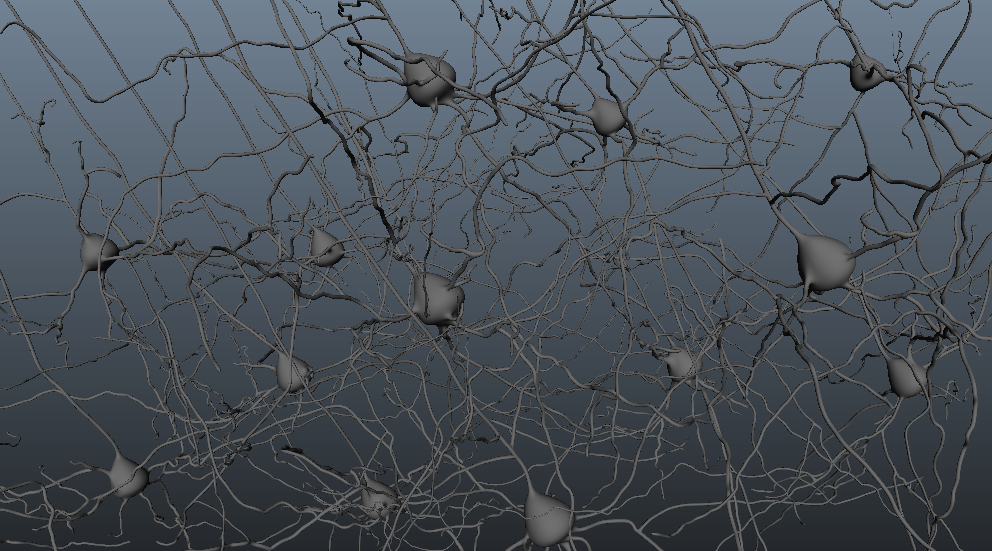
Here's a couple still frames from shots that are of the neural environment in my animation. I went through a number of iterations of texturing and lighting setups to try to get a feeling of a dark, heavily populated space. I'm using small particles, backlighting, and shallow DOF to try to get something of a aqueous micro-environment. The particles are very de-emphasized because they shouldn't draw attention to themselves, but they are a subtle part of the animation.

This shows the long apical dendrites of pyramidal cells with astrocytes and interneurons interspersed.


The probe allows for photoconversion of fluorescent molecules.


Pretty much exactly a month left. Tick tock.

Later,
Stuart

Friday, May 31, 2013

Luminance depth layer with mental ray

This is the first post in quite a long time that's not related to my master's research project (well it is, kinda), but I felt like I had to share this, because it resolves a pretty long standing issue that has bothered me. Hopefully it is of use to a couple other people as well.

First off, credit for this goes to this member of creative cow (all of six years ago): http://forums.creativecow.net/thread/61/857907#857910

Rendering a luminance depth (or z-depth) layer in mental ray so that it respects smooth mesh preview:

There are a number of ways to get a depth pass out of maya that I won't get into. I much prefer to use a separate render layer because it is so fast to (re-)render and you have much more control over the details, than if you use a render pass on a beauty layer. But the problem with using the luminance depth preset on a render layer is that it forces you to use Maya software, which doesn't respect smooth mesh preview, so your depth pass doesn't line up with your other passes (I'm referring to layers and passes interchangeably here). And if you switch to mental ray, the pre-built shader setup doesn't work when you batch render.

So, here is the shading network that will give you the exact same information as the luminance depth preset, but in mental ray.

1) Create each of these nodes and link them as follows:


a) samplerInfo.pointCamera > distanceBetween.point1
b) distanceBetween.distance > setRange.valueX
c) setRange.outValueX > Ramp.vCoord
d) Ramp.outColor > SurfaceShader.outColor

2) It doesn't look like it in the thumbnail, but the ramp should look like this (white on bottom, black on top)


3) And the final things are to change the Max value in the setRange to 1 (I think this might have been missed in the original thread). And change the Old min and Old max to the range you want the transition to be over. Use the distance tool to check the distance you want. You can key this as well, but it might be easier to do that in post, depending on the scene.
Update (28/08/2014): I have noticed that in some instances large world distance values don't work. Instead I have to divide the values by 10 or 100 to get a proper range. I suspect this has something to with camera coordinate space, which is what the samplerInfo is using, but I don't really understand it. Comments are welcome on this point.


4) And the actually real final thing is to put all your geo into a new render layer and give it a material override with this new surface shader.

5) And render.

And this is the difference between maya software and mental ray.


There is still faceting in the mental ray, but in that case you have the control, instead of being limited to maya software render. Let me know in the comments if it works for you, or if I've missed something.

And my render is done, so I'll jump back to maya now.

Later,
Stuart

PS Okay, one last tip I'm experimenting with. nHair doesn't seem to work with this custom surface shader (there might be a way). The hair I want to be in the depth pass is darkish grey, so I've just added a directional light and increased the intensity until the hair renders at about the value I want. Nothing else is affected of course. Not super precise, but better than not including the hair in the depth pass. We'll see how it turns out.

Sunday, May 26, 2013

RIN - Grooming

A couple more rendered stills. I've got the mouse all behaving and rendered and I'm fairly pleased with it. I wasn't sure how the "glass" idea would actually work with a fully animated mouse. I did have to do some animation tweaks and re-rendering to fix some strange refractive issues, but overall I think it is successful. You'll have to wait to see the animated version for your verdict, but here's a frame (with some motion blur) of some grooming.


And I've composited the microscope with some closeups showing the action in the scene.


Finally, I'm blocking out another shot that's ultimately going to have lots and lots of neurons. These are just some pyramidal cells so far. (Neuron Builder v0.91 worked pretty nicely for this).


I've currently got several shots in various stages of the pipeline, so this week I'm really hoping to tidy up loose ends and get production really focused. May is coming to a close and so I've got just about a month and a bit left in production.

Later,
Stuart

Tuesday, May 14, 2013

RIN - Microscope rendered

Here's a render from the shot featuring the microscope. It is emitting light that will excite GFP in neurons in a thin slice of brain tissue. I still need to do some compositing on this shot, but it's pretty close to done.


I'm also currently rendering out my animated mouse. Here's a playblast of him moving around:


Later,
Stuart