Happy New Year!
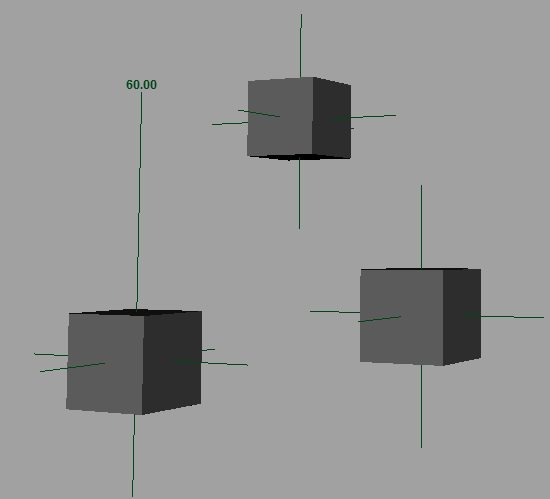
Angular data, which will help with animating the ant I am working on, requires that I measure the angles between various components of the model. Maya, strangely, doesn't have a readily usable way to measure angles. There are a number of scripts out there, but I wanted to try my hand at creating a script that might be more functional and robust than some other solutions out there.
Measure Angle works with a quick mode and a UI mode (see the text file for some documentation). With UI mode, components and objects can be used to input world translate values. With quick mode, just select three objects, double-click the shelf button, and the angle is built.
Locators are placed in the scene which can then be constrained to objects to automatically update measurements. I thought it was important to have an annotation with the angle in the scene. The real trick was getting viewport text that would update continually. The result isn't perfect, but I believe it's fairly good. The annotation is driven by an expression, so it will update a) with a time change (scrub the timeline) b) if you hit the Refresh Annotations button or c) for constant updates, if the master node AE extra attributes is open (Copy Tab and minimize it).
There are some handy extra attributes (radians and degrees, visibility, and the extra updater angle value that helps keep the expression evaluating).
I'd be happy to hear some feedback on the script. I've only tested it on Maya 2015 Win x64, so other platforms would be good to hear about.
Later,
Stuart
Tuesday, January 20, 2015
Monday, December 15, 2014
Ant leg
And some legs. The front, middle, and rear leg pairs are all slightly different structurally, so I will be duplicating the front legs and tweaking the shapes to fit my reference images.
Would you believe I'm still working on my book cover? Turns out xgen for maya isn't tremendously user friendly or intuitive or stable at this point. I'm also moving this week... so I'd really love to get it down. We'll see. Turns out I'm not willing to compromise on the book cover, nor publish with a placeholder. Nor was I able to perform a quick and elegant execution. So, as with so many indie developers, it'll be released when it's done. My hope is that although the world isn't awaiting this release with bated breat, some of this delay may increase excitement? I'm not sure.
Later,
Stuart
Would you believe I'm still working on my book cover? Turns out xgen for maya isn't tremendously user friendly or intuitive or stable at this point. I'm also moving this week... so I'd really love to get it down. We'll see. Turns out I'm not willing to compromise on the book cover, nor publish with a placeholder. Nor was I able to perform a quick and elegant execution. So, as with so many indie developers, it'll be released when it's done. My hope is that although the world isn't awaiting this release with bated breat, some of this delay may increase excitement? I'm not sure.
Later,
Stuart
Friday, December 12, 2014
Ant modelling
This is the real version of the ant model. The anatomy is much more accurate (I hope) than last time. Note the five segmented gaster, the lack of separation between scape insertion and clypeus, the emarginate thorax, and the divergent frontal carinae. Any guesses as to the species? I might have already mentioned it.
Still lots of work to be done, but I'm learning a lot about sculpting and ant anatomy, that's for sure.
As for my book, well the formatting is complete, and I'm working on the cover, so it should be published this weekend.
Later,
Stuart
Still lots of work to be done, but I'm learning a lot about sculpting and ant anatomy, that's for sure.
As for my book, well the formatting is complete, and I'm working on the cover, so it should be published this weekend.
Later,
Stuart
Monday, December 1, 2014
Non-repeating noise in maya
I'm creating a large surface that I want to have very fine noise. I made a fractal texture and got a style of noise I was fairly happy with. However, to get the scale right, I needed to increase the repeatU and repeatV a ton, around 800. This creates obvious and ugly repeats.
A quick google search led me to this blog post: http://www.sigillarium.com/blog/lang/en/318/
The author describes using two animated fractals (animated just to get two different values) as input to the translateU and translateV of the original fractal. I tried a couple variations of this, but the biggest problem I found was that it destroyed the integrity (shapes) of the original fractal I created. Sometimes it made weird swirly noise, other times it just created tiny random noise.
After thinking about it a bit, I decided to pipe the outAlpha of a simple fractal into the time attribute of my crafted fractal with animated checked on. This resulted in a variation of the evolution of the fractal over the surface and really reduced any noticeable repetition, while largely maintaining the "structure" of the original fractal, because it is just evolving different parts of the surface to different times.
Hope that helps someone out and thanks to Sigillarium for the foundation of the idea.
Later,
Stuart
A quick google search led me to this blog post: http://www.sigillarium.com/blog/lang/en/318/
The author describes using two animated fractals (animated just to get two different values) as input to the translateU and translateV of the original fractal. I tried a couple variations of this, but the biggest problem I found was that it destroyed the integrity (shapes) of the original fractal I created. Sometimes it made weird swirly noise, other times it just created tiny random noise.
After thinking about it a bit, I decided to pipe the outAlpha of a simple fractal into the time attribute of my crafted fractal with animated checked on. This resulted in a variation of the evolution of the fractal over the surface and really reduced any noticeable repetition, while largely maintaining the "structure" of the original fractal, because it is just evolving different parts of the surface to different times.
Hope that helps someone out and thanks to Sigillarium for the foundation of the idea.
Later,
Stuart
Sunday, November 30, 2014
Severing a Dendrite - Update
Well the end of November is here and my book is as finished as it will get. At least the words are. When I uploaded to Kindle Direct Publishing, several formatting issues became apparent and I need to work those out before I release it. I also am working on a cover that will take more time to completion.
I intended to wrap that all up this weekend, but other things got in the way. I'm performing in a play this Saturday, and that consumed much of these final two days of November. So I pray your patience a little longer before this thing will be out the door. Honestly this delay is probably bothering me more than anyone else, but I felt an update was still in order.
Later,
Stuart
I intended to wrap that all up this weekend, but other things got in the way. I'm performing in a play this Saturday, and that consumed much of these final two days of November. So I pray your patience a little longer before this thing will be out the door. Honestly this delay is probably bothering me more than anyone else, but I felt an update was still in order.
Later,
Stuart
Thursday, November 27, 2014
Ant Practice
Some more work on F. polyctena, based on the Eric Keller tut I mentioned in the previous post. Again, this is a practice run through to learn ZBrush and the workflow. I'm expecting to do a more accurate and careful model for the real thing, which, even though I'm paying more attention to the morphology, should go faster, now that I'm getting more comfortable with the program.
Retopologizing the dynamesh down to a cleaner mesh.
Adding some interesting detail.
Painting using photographs of the ant as stencils.
I am also getting quite close to finished my book, in a process I'm calling amateur copy-editing. Just a couple chapters left. So the book should be available Nov 30 as promised. I'm hoping to create a nice cover, but time is short. It remains to be seen whether I will compromise on the cover for the sake of time, put up a placeholder for the time being, or execute with aplomb.
Later,
Stuart
Retopologizing the dynamesh down to a cleaner mesh.
Adding some interesting detail.
Painting using photographs of the ant as stencils.
I am also getting quite close to finished my book, in a process I'm calling amateur copy-editing. Just a couple chapters left. So the book should be available Nov 30 as promised. I'm hoping to create a nice cover, but time is short. It remains to be seen whether I will compromise on the cover for the sake of time, put up a placeholder for the time being, or execute with aplomb.
Later,
Stuart
Thursday, November 20, 2014
Ant WIP
As part of my research at the UofT, we're designing an experiment to look at how students learn complex motion through animations. The complex motion in this case is an ant walking, so as a part of that, I'm creating an ant model for the animation(s).
This is my first attempt. There are anatomical problems, and it's not tremendously accurate. I'm mostly using it as a practice run as I learn how to use ZBrush better. I'm going through Eric Keller's Hyper-real Insect Design tutorial. I finally feel like I'm getting a solid handle on how to use ZBrush, even managing to troubleshoot some strange issues that I've run into.
In other news, I'm about 2/3 through "editing" my book, so I'm hopeful I'll be able to release it as promised on Nov 30.
Later,
Stuart
This is my first attempt. There are anatomical problems, and it's not tremendously accurate. I'm mostly using it as a practice run as I learn how to use ZBrush better. I'm going through Eric Keller's Hyper-real Insect Design tutorial. I finally feel like I'm getting a solid handle on how to use ZBrush, even managing to troubleshoot some strange issues that I've run into.
In other news, I'm about 2/3 through "editing" my book, so I'm hopeful I'll be able to release it as promised on Nov 30.
Later,
Stuart
Saturday, November 1, 2014
NaNoWriMo Revisited - First chapter and release date
If you are a long time reader of this blog, you may remember that way back, I participated in NaNoWriMo (National Novel Writing Month). This adventure is chronicled here, here and here. All of the links and widgets are now broken, but you can visit the NaNoWriMo site to get an idea of the process. Today is the right time to start if you want to try it yourself.
I've written more explanation in the foreword of the book, but the brief-ish (brie-fish? mmm) story is this: I wrote the book in November 2009, saved it, and closed it. I meant to go back and edit it or at least read it, because I quite enjoyed the writing process, but it wasn't until this year that I read it in its entirety for the first time. I've decided I don't want to spend the time on a really deep edit and reworking, because other projects are more pressing and relevant to my career goals, but I do want people to get a chance to check it out. So I've just been doing some basic formatting, typo correction, few tweaks, grammar, that sort of thing.
I'm announcing that I will be releasing my debut novel "Severing a Dendrite" via Kindle Direct Publishing on November 30th! The minimum allowed price for that platform (with 70% royalty) is $2.99, so that's what it'll be. But just to pique your interest and hopefully get you to throw the three dollars at Amazon so they can throw two dollars at me, I'll be sharing the first chapter now and another several chapters on the release day for free right here on this blog.
Here is the link to download the first chapter in pdf format: http://goo.gl/tBx9Jd
You may have to right click and "save link as..." if just clicking on it doesn't prompt a download.
And if you like clicking on pictures, here's one with the same result, i.e. pdf downloaded.
The text on the pages should be large enough that reading on a mobile device or e-reader will be possible. For reading in Adobe Reader, I would recommend View > Page Display > Two Page View for a more book-like experience. For the final release, I will be sharing a more substantial section of the book (the first five chapters!) for free in kindle and epub formats so you don't have to bother with pdfs, although I think for full compatibility and ease of reading, I will post a pdf of that too.
Hope you enjoy it!
Later,
Stuart
I've written more explanation in the foreword of the book, but the brief-ish (brie-fish? mmm) story is this: I wrote the book in November 2009, saved it, and closed it. I meant to go back and edit it or at least read it, because I quite enjoyed the writing process, but it wasn't until this year that I read it in its entirety for the first time. I've decided I don't want to spend the time on a really deep edit and reworking, because other projects are more pressing and relevant to my career goals, but I do want people to get a chance to check it out. So I've just been doing some basic formatting, typo correction, few tweaks, grammar, that sort of thing.
I'm announcing that I will be releasing my debut novel "Severing a Dendrite" via Kindle Direct Publishing on November 30th! The minimum allowed price for that platform (with 70% royalty) is $2.99, so that's what it'll be. But just to pique your interest and hopefully get you to throw the three dollars at Amazon so they can throw two dollars at me, I'll be sharing the first chapter now and another several chapters on the release day for free right here on this blog.
Here is the link to download the first chapter in pdf format: http://goo.gl/tBx9Jd
You may have to right click and "save link as..." if just clicking on it doesn't prompt a download.
And if you like clicking on pictures, here's one with the same result, i.e. pdf downloaded.
The text on the pages should be large enough that reading on a mobile device or e-reader will be possible. For reading in Adobe Reader, I would recommend View > Page Display > Two Page View for a more book-like experience. For the final release, I will be sharing a more substantial section of the book (the first five chapters!) for free in kindle and epub formats so you don't have to bother with pdfs, although I think for full compatibility and ease of reading, I will post a pdf of that too.
Hope you enjoy it!
Later,
Stuart
Thursday, October 30, 2014
How to Ask Questions on Forums
Preamble:
This article is a set of "best practices" based primarily on my own observations from asking, reading, answering, and not answering questions posted on CG forums. The advice here is written with 3D creative software in mind, but many ideas can be generalized to other topics. Likewise, not every point will be relevant for every query; pick and choose what makes sense. Finally, though the advice is intended to increase the probability of a timely and helpful response, there is no guarantee this will happen. Some questions just don't get answered and it's a good idea to have a backup plan in mind.
The presumption here is that you have run into a problem during your creative endeavors. Perhaps you are following a tutorial and the sequence of steps you are doing doesn't match the instructor's result. Or perhaps you've encountered what looks like a hideous bug, complete with jagged legs and colorless eyes. Or maybe you're trying to produce a particular effect and you just don't know how to go about achieving it. You look around the room, but there's no one nearby to help out. Time to go to the interwebs.
The preparation:
Before you create a post on a forum, it's important to do your due diligence.
1) Do some searching to see if an existing solution can be found. Effective web searching, or "googling" as the kids are calling it these days, is an important topic for another time. The basic idea is to use the right terminology, filter for your software version, and try many searches with different phrases. Most problems have been encountered by someone else before you, and it saves everyone time if you can find an existing solution rather than posting about it again.
2) Try to understand a bit more about your problem. Even if you can't find a direct solution, it can be extremely effective to educate yourself about certain terms and ideas related to your problem (e.g. How does Final Gather actually work? What are "normals"? What part of the software controls motion interpolation between keys?). This will help you use the right words in your forum question and sound more intelligent in the process.
The title:
The title of your post should be concise and informative. It is useless to say "Help please" or "Urgent problem"; these types of titles make you sound as though you aren't willing to make an effort. Likewise "Modelling question" or "Issue with render" are equally uninformative. Try to use terms specific to your problem (e.g. "Geometry doesn't follow skeleton", "Creases in mesh after boolean", or "Jagged shadows in render"). Without even clicking on the topic, an experienced user might already have an idea of what the problem might be and a few possible solutions. Congratulations, you've just hooked someone into helping.
The post:
Above all, be courteous. In most instances, the person who ends up helping you will be doing so with no reward or compensation besides the satisfaction of solving a problem and assisting a fellow user. You may be tearing your hair out and warming up your computer-tossing arm, but take a few breaths and approach this professionally.
Start with a one to two sentence summary of your problem. Again, many forum browsers will be doing so in their spare time, so in the event someone doesn't have time to read a longer message, give them the low-down up front. This should be a slightly fleshed out version of your post title (e.g. "I was using the bridge tool to connect a series of edges and the resulting faces don't appear to have any material"). This raises the importance of correct terminology; make sure you're giving tools and commands the right name and look around to find what words other people use when they face similar problems.
Add a couple of line breaks, because smaller chunks of text are visually more inviting to read than a huge block. Then provide some context for the question. What were you doing when you encountered the problem? A detailed sequence of steps will hopefully allow someone to reproduce the problem. What are you trying to achieve? No one can read your mind, so be clear about the desired outcome (maybe you're after more noise in your render). Are you following a tutorial? If so, add a link or share an image of the pertinent step (if copyright allows). What is your experience level? If you've been using software X and have just switched to Y, another convert might be the best person to understand your situation. If you're a senior lighting TD, people will be less likely to assume a newbie error.
Do include what you have already tried. What do you mean you haven't tried anything? Go away and come back when you have. This way users won't waste your time and theirs by suggesting things you've already attempted. It also proves you're serious about finding the answer.
Don't include how frustrated you are and how you have a deadline this weekend and how this always seems to happen and other editorializing. Everyone's project is important and frantic cries will probably not speed things up.
Generally it is a good idea to include your software version. Include hardware info if and only if you suspect a possible hardware problem. Include operating system info if and only if you suspect an operating system problem. If you are getting an error message, copy and paste the error message word for word exactly.
Include screenshots and other images whenever possible. A picture says—what was it, eight hundred words? This being said, don't add eleven screenshots when two will tell the whole story. If you want to show a problem related to geometry, wireframe on shaded is the easiest to interpret. Figure out in your operating system how to take a screenshot of a region of the screen. This will save you time cropping. If you have to capture the whole screen, take that bad boy into an image editor and crop it to the relevant region. No one wants to open and zoom a 2560x1440 image that has a 200 pixel square region showing your glitchy model. Mark up the image too. Take your virtual red pen and add circles, arrows, and exclamation marks (maybe not the last one) to tell others where to look. Use text in your post to tell us what we're looking at too (Is this the broken texture or the one that was working properly?).
Finally, thank readers for their time and assistance and hit submit. Someone may reply within minutes, hours, days, or perhaps not at all. You've crafted a professional, informative question and now you can't do any more—or can you? While you're waiting for a reply, keep doing your research and experiments to try to solve the problem on your own or at least learn more about it.
The follow-up:
If you don't get any responses within what you feel is a reasonable amount of time, don't "bump" the post or say "Twelve views and no replies? What's the matter with people?" Be patient and keep investigating on your own. If you really feel the thread has been lost among the others, you can add a reply with some new information or other solutions you've attempted.
If you were provided an effective solution, write back to a) say thank you and b) confirm that the suggested solution worked. This will help future readers know what to try. If you were provided a partial solution, write back to say what part worked and what didn't. If you were able to solve the rest on your own, make sure to add the specifics of the complete solution, again for future reference. If the offered solution didn't work, share any new behaviour you're experiencing and, as always, be polite.
Conclusion:
While much of this article may seem like common sense, I hope at least it provided new perspective on composing questions on forums. As a final thought, consider the potential time investment by both parties. If you can get a quick and informative answer, it may save you hours or even days of troubleshooting. On the flip side, another user browsing through a forum likely has many threads available to look through. If they can't understand your problem in a minute or two, they will likely move on and help other people; typically they have nothing invested. Therefore, spend that little bit of extra time to craft your query carefully and it will be rewarded.
Thanks for reading.
Stuart
This article is a set of "best practices" based primarily on my own observations from asking, reading, answering, and not answering questions posted on CG forums. The advice here is written with 3D creative software in mind, but many ideas can be generalized to other topics. Likewise, not every point will be relevant for every query; pick and choose what makes sense. Finally, though the advice is intended to increase the probability of a timely and helpful response, there is no guarantee this will happen. Some questions just don't get answered and it's a good idea to have a backup plan in mind.
The presumption here is that you have run into a problem during your creative endeavors. Perhaps you are following a tutorial and the sequence of steps you are doing doesn't match the instructor's result. Or perhaps you've encountered what looks like a hideous bug, complete with jagged legs and colorless eyes. Or maybe you're trying to produce a particular effect and you just don't know how to go about achieving it. You look around the room, but there's no one nearby to help out. Time to go to the interwebs.
The preparation:
Before you create a post on a forum, it's important to do your due diligence.
1) Do some searching to see if an existing solution can be found. Effective web searching, or "googling" as the kids are calling it these days, is an important topic for another time. The basic idea is to use the right terminology, filter for your software version, and try many searches with different phrases. Most problems have been encountered by someone else before you, and it saves everyone time if you can find an existing solution rather than posting about it again.
2) Try to understand a bit more about your problem. Even if you can't find a direct solution, it can be extremely effective to educate yourself about certain terms and ideas related to your problem (e.g. How does Final Gather actually work? What are "normals"? What part of the software controls motion interpolation between keys?). This will help you use the right words in your forum question and sound more intelligent in the process.
The title:
The title of your post should be concise and informative. It is useless to say "Help please" or "Urgent problem"; these types of titles make you sound as though you aren't willing to make an effort. Likewise "Modelling question" or "Issue with render" are equally uninformative. Try to use terms specific to your problem (e.g. "Geometry doesn't follow skeleton", "Creases in mesh after boolean", or "Jagged shadows in render"). Without even clicking on the topic, an experienced user might already have an idea of what the problem might be and a few possible solutions. Congratulations, you've just hooked someone into helping.
The post:
Above all, be courteous. In most instances, the person who ends up helping you will be doing so with no reward or compensation besides the satisfaction of solving a problem and assisting a fellow user. You may be tearing your hair out and warming up your computer-tossing arm, but take a few breaths and approach this professionally.
Start with a one to two sentence summary of your problem. Again, many forum browsers will be doing so in their spare time, so in the event someone doesn't have time to read a longer message, give them the low-down up front. This should be a slightly fleshed out version of your post title (e.g. "I was using the bridge tool to connect a series of edges and the resulting faces don't appear to have any material"). This raises the importance of correct terminology; make sure you're giving tools and commands the right name and look around to find what words other people use when they face similar problems.
Add a couple of line breaks, because smaller chunks of text are visually more inviting to read than a huge block. Then provide some context for the question. What were you doing when you encountered the problem? A detailed sequence of steps will hopefully allow someone to reproduce the problem. What are you trying to achieve? No one can read your mind, so be clear about the desired outcome (maybe you're after more noise in your render). Are you following a tutorial? If so, add a link or share an image of the pertinent step (if copyright allows). What is your experience level? If you've been using software X and have just switched to Y, another convert might be the best person to understand your situation. If you're a senior lighting TD, people will be less likely to assume a newbie error.
Do include what you have already tried. What do you mean you haven't tried anything? Go away and come back when you have. This way users won't waste your time and theirs by suggesting things you've already attempted. It also proves you're serious about finding the answer.
Don't include how frustrated you are and how you have a deadline this weekend and how this always seems to happen and other editorializing. Everyone's project is important and frantic cries will probably not speed things up.
Generally it is a good idea to include your software version. Include hardware info if and only if you suspect a possible hardware problem. Include operating system info if and only if you suspect an operating system problem. If you are getting an error message, copy and paste the error message word for word exactly.
Include screenshots and other images whenever possible. A picture says—what was it, eight hundred words? This being said, don't add eleven screenshots when two will tell the whole story. If you want to show a problem related to geometry, wireframe on shaded is the easiest to interpret. Figure out in your operating system how to take a screenshot of a region of the screen. This will save you time cropping. If you have to capture the whole screen, take that bad boy into an image editor and crop it to the relevant region. No one wants to open and zoom a 2560x1440 image that has a 200 pixel square region showing your glitchy model. Mark up the image too. Take your virtual red pen and add circles, arrows, and exclamation marks (maybe not the last one) to tell others where to look. Use text in your post to tell us what we're looking at too (Is this the broken texture or the one that was working properly?).
Finally, thank readers for their time and assistance and hit submit. Someone may reply within minutes, hours, days, or perhaps not at all. You've crafted a professional, informative question and now you can't do any more—or can you? While you're waiting for a reply, keep doing your research and experiments to try to solve the problem on your own or at least learn more about it.
The follow-up:
If you don't get any responses within what you feel is a reasonable amount of time, don't "bump" the post or say "Twelve views and no replies? What's the matter with people?" Be patient and keep investigating on your own. If you really feel the thread has been lost among the others, you can add a reply with some new information or other solutions you've attempted.
If you were provided an effective solution, write back to a) say thank you and b) confirm that the suggested solution worked. This will help future readers know what to try. If you were provided a partial solution, write back to say what part worked and what didn't. If you were able to solve the rest on your own, make sure to add the specifics of the complete solution, again for future reference. If the offered solution didn't work, share any new behaviour you're experiencing and, as always, be polite.
Conclusion:
While much of this article may seem like common sense, I hope at least it provided new perspective on composing questions on forums. As a final thought, consider the potential time investment by both parties. If you can get a quick and informative answer, it may save you hours or even days of troubleshooting. On the flip side, another user browsing through a forum likely has many threads available to look through. If they can't understand your problem in a minute or two, they will likely move on and help other people; typically they have nothing invested. Therefore, spend that little bit of extra time to craft your query carefully and it will be rewarded.
Thanks for reading.
Stuart
Tuesday, October 28, 2014
Cover Teaser
I currently have a journal article in review, and if it gets accepted, I can submit an image to be considered for the cover. This, potentially, is a very cool opportunity, so I've been working on an image suitable for the cover and related to the article. I haven't heard back yet about the manuscript, but I couldn't resist sharing a teaser of the image here. Hope you're intrigued.
Later,
Stuart
Later,
Stuart
Subscribe to:
Posts (Atom)