The April issue of Nature Methods includes a publication (doi:10.1038/nmeth.3334) that I wrote with support from my supervisors regarding the topic of including citations with scientific animations. I'm very pleased that it was accepted at a journal with such high standing and repute. I hope the ideas get some traction in the scientific and biomedical animation communities.
I submitted an image for consideration of the cover. Unfortunately, it wasn't accepted as the cover for the issue, but I'm still pleased with how it turned out. It's based on an earlier 70S Ribosome image, but instead of depicting the components of the ribosome, it depicts how different data sources can be brought together, adapted, and supplemented with artistic considerations to create a scientific illustration. I would guess that many people do not know the breadth of decisions that are made for even a simple illustration.
Here are a couple of details from the piece.
I apologize for the long absence on this blog. I have been (and am) on parental leave with my new son. It has been a fantastic time with new priorities. I hope I will be able to once again update this blog frequently, with some exciting new projects in mind. Thank you for your readership and sharing, and I will write again (and illustrate) more soon.
Later,
Stuart
Thursday, April 2, 2015
Friday, January 23, 2015
Control curves template
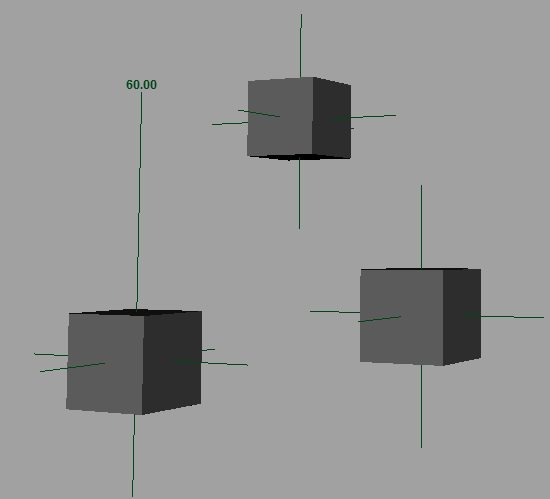
I made another simple little utility/template file for rigging purposes. It's pretty common to have to make control curves of various shapes to use in rigs.

The control curves each have additional attributes that let you set the drawing color override, as in the image above, which is a nice visual indicator for rigs.
Hope that's useful for someone.
Later,
Stuart
Download the maya template here (it is a 2015 file, but checking ignore version should be okay): http://goo.gl/h3rNmU
All you need to do for your rig file is import the maya file (merge into the default namespace), open up the template group, select the one you want, and then run this script:
string $dupCtrlList[] = `duplicate -rr`; //duplicate control
for ($duplicateCtrl in $dupCtrlList){
parent -w $duplicateCtrl; //unparent from template group
editDisplayLayerMembers -noRecurse "defaultLayer" $duplicateCtrl; //remove from display layer
string $shapeNodes[] = `listRelatives -s -path $duplicateCtrl`; //get list of shape nodes
for ($shape in $shapeNodes){ //for each shape node, connect display overrides
connectAttr -f ($duplicateCtrl + ".wireOverride") ($shape + ".overrideEnabled");
connectAttr -f ($duplicateCtrl + ".wireColor") ($shape + ".overrideColor");
}
}
I've put this script on my shelf with this nice little circle icon:for ($duplicateCtrl in $dupCtrlList){
parent -w $duplicateCtrl; //unparent from template group
editDisplayLayerMembers -noRecurse "defaultLayer" $duplicateCtrl; //remove from display layer
string $shapeNodes[] = `listRelatives -s -path $duplicateCtrl`; //get list of shape nodes
for ($shape in $shapeNodes){ //for each shape node, connect display overrides
connectAttr -f ($duplicateCtrl + ".wireOverride") ($shape + ".overrideEnabled");
connectAttr -f ($duplicateCtrl + ".wireColor") ($shape + ".overrideColor");
}
}
The control curves each have additional attributes that let you set the drawing color override, as in the image above, which is a nice visual indicator for rigs.
Hope that's useful for someone.
Later,
Stuart
Thursday, January 22, 2015
Ant sculpting updates
The ant is still progressing along, in and amongst other things. The base model is finished, provided there are no revisions for the gross anatomy.
I've retopologized it using ZRemesher (process as below), and am working on fixing the UV maps in Maya. Some strangeness there, but shall press on.
Then it's detailing, texturing, finishing the rig and getting everything animation ready.
Later,
Stuart
I've retopologized it using ZRemesher (process as below), and am working on fixing the UV maps in Maya. Some strangeness there, but shall press on.
Then it's detailing, texturing, finishing the rig and getting everything animation ready.
Later,
Stuart
Tuesday, January 20, 2015
Angle Measurement
Happy New Year!
Angular data, which will help with animating the ant I am working on, requires that I measure the angles between various components of the model. Maya, strangely, doesn't have a readily usable way to measure angles. There are a number of scripts out there, but I wanted to try my hand at creating a script that might be more functional and robust than some other solutions out there.
Measure Angle works with a quick mode and a UI mode (see the text file for some documentation). With UI mode, components and objects can be used to input world translate values. With quick mode, just select three objects, double-click the shelf button, and the angle is built.
Locators are placed in the scene which can then be constrained to objects to automatically update measurements. I thought it was important to have an annotation with the angle in the scene. The real trick was getting viewport text that would update continually. The result isn't perfect, but I believe it's fairly good. The annotation is driven by an expression, so it will update a) with a time change (scrub the timeline) b) if you hit the Refresh Annotations button or c) for constant updates, if the master node AE extra attributes is open (Copy Tab and minimize it).
There are some handy extra attributes (radians and degrees, visibility, and the extra updater angle value that helps keep the expression evaluating).
I'd be happy to hear some feedback on the script. I've only tested it on Maya 2015 Win x64, so other platforms would be good to hear about.
Later,
Stuart
Angular data, which will help with animating the ant I am working on, requires that I measure the angles between various components of the model. Maya, strangely, doesn't have a readily usable way to measure angles. There are a number of scripts out there, but I wanted to try my hand at creating a script that might be more functional and robust than some other solutions out there.
Measure Angle works with a quick mode and a UI mode (see the text file for some documentation). With UI mode, components and objects can be used to input world translate values. With quick mode, just select three objects, double-click the shelf button, and the angle is built.
Locators are placed in the scene which can then be constrained to objects to automatically update measurements. I thought it was important to have an annotation with the angle in the scene. The real trick was getting viewport text that would update continually. The result isn't perfect, but I believe it's fairly good. The annotation is driven by an expression, so it will update a) with a time change (scrub the timeline) b) if you hit the Refresh Annotations button or c) for constant updates, if the master node AE extra attributes is open (Copy Tab and minimize it).
There are some handy extra attributes (radians and degrees, visibility, and the extra updater angle value that helps keep the expression evaluating).
I'd be happy to hear some feedback on the script. I've only tested it on Maya 2015 Win x64, so other platforms would be good to hear about.
Later,
Stuart
Monday, December 15, 2014
Ant leg
And some legs. The front, middle, and rear leg pairs are all slightly different structurally, so I will be duplicating the front legs and tweaking the shapes to fit my reference images.
Would you believe I'm still working on my book cover? Turns out xgen for maya isn't tremendously user friendly or intuitive or stable at this point. I'm also moving this week... so I'd really love to get it down. We'll see. Turns out I'm not willing to compromise on the book cover, nor publish with a placeholder. Nor was I able to perform a quick and elegant execution. So, as with so many indie developers, it'll be released when it's done. My hope is that although the world isn't awaiting this release with bated breat, some of this delay may increase excitement? I'm not sure.
Later,
Stuart
Would you believe I'm still working on my book cover? Turns out xgen for maya isn't tremendously user friendly or intuitive or stable at this point. I'm also moving this week... so I'd really love to get it down. We'll see. Turns out I'm not willing to compromise on the book cover, nor publish with a placeholder. Nor was I able to perform a quick and elegant execution. So, as with so many indie developers, it'll be released when it's done. My hope is that although the world isn't awaiting this release with bated breat, some of this delay may increase excitement? I'm not sure.
Later,
Stuart
Friday, December 12, 2014
Ant modelling
This is the real version of the ant model. The anatomy is much more accurate (I hope) than last time. Note the five segmented gaster, the lack of separation between scape insertion and clypeus, the emarginate thorax, and the divergent frontal carinae. Any guesses as to the species? I might have already mentioned it.
Still lots of work to be done, but I'm learning a lot about sculpting and ant anatomy, that's for sure.
As for my book, well the formatting is complete, and I'm working on the cover, so it should be published this weekend.
Later,
Stuart
Still lots of work to be done, but I'm learning a lot about sculpting and ant anatomy, that's for sure.
As for my book, well the formatting is complete, and I'm working on the cover, so it should be published this weekend.
Later,
Stuart
Monday, December 1, 2014
Non-repeating noise in maya
I'm creating a large surface that I want to have very fine noise. I made a fractal texture and got a style of noise I was fairly happy with. However, to get the scale right, I needed to increase the repeatU and repeatV a ton, around 800. This creates obvious and ugly repeats.
A quick google search led me to this blog post: http://www.sigillarium.com/blog/lang/en/318/
The author describes using two animated fractals (animated just to get two different values) as input to the translateU and translateV of the original fractal. I tried a couple variations of this, but the biggest problem I found was that it destroyed the integrity (shapes) of the original fractal I created. Sometimes it made weird swirly noise, other times it just created tiny random noise.
After thinking about it a bit, I decided to pipe the outAlpha of a simple fractal into the time attribute of my crafted fractal with animated checked on. This resulted in a variation of the evolution of the fractal over the surface and really reduced any noticeable repetition, while largely maintaining the "structure" of the original fractal, because it is just evolving different parts of the surface to different times.
Hope that helps someone out and thanks to Sigillarium for the foundation of the idea.
Later,
Stuart
A quick google search led me to this blog post: http://www.sigillarium.com/blog/lang/en/318/
The author describes using two animated fractals (animated just to get two different values) as input to the translateU and translateV of the original fractal. I tried a couple variations of this, but the biggest problem I found was that it destroyed the integrity (shapes) of the original fractal I created. Sometimes it made weird swirly noise, other times it just created tiny random noise.
After thinking about it a bit, I decided to pipe the outAlpha of a simple fractal into the time attribute of my crafted fractal with animated checked on. This resulted in a variation of the evolution of the fractal over the surface and really reduced any noticeable repetition, while largely maintaining the "structure" of the original fractal, because it is just evolving different parts of the surface to different times.
Hope that helps someone out and thanks to Sigillarium for the foundation of the idea.
Later,
Stuart
Sunday, November 30, 2014
Severing a Dendrite - Update
Well the end of November is here and my book is as finished as it will get. At least the words are. When I uploaded to Kindle Direct Publishing, several formatting issues became apparent and I need to work those out before I release it. I also am working on a cover that will take more time to completion.
I intended to wrap that all up this weekend, but other things got in the way. I'm performing in a play this Saturday, and that consumed much of these final two days of November. So I pray your patience a little longer before this thing will be out the door. Honestly this delay is probably bothering me more than anyone else, but I felt an update was still in order.
Later,
Stuart
I intended to wrap that all up this weekend, but other things got in the way. I'm performing in a play this Saturday, and that consumed much of these final two days of November. So I pray your patience a little longer before this thing will be out the door. Honestly this delay is probably bothering me more than anyone else, but I felt an update was still in order.
Later,
Stuart
Thursday, November 27, 2014
Ant Practice
Some more work on F. polyctena, based on the Eric Keller tut I mentioned in the previous post. Again, this is a practice run through to learn ZBrush and the workflow. I'm expecting to do a more accurate and careful model for the real thing, which, even though I'm paying more attention to the morphology, should go faster, now that I'm getting more comfortable with the program.
Retopologizing the dynamesh down to a cleaner mesh.
Adding some interesting detail.
Painting using photographs of the ant as stencils.
I am also getting quite close to finished my book, in a process I'm calling amateur copy-editing. Just a couple chapters left. So the book should be available Nov 30 as promised. I'm hoping to create a nice cover, but time is short. It remains to be seen whether I will compromise on the cover for the sake of time, put up a placeholder for the time being, or execute with aplomb.
Later,
Stuart
Retopologizing the dynamesh down to a cleaner mesh.
Adding some interesting detail.
Painting using photographs of the ant as stencils.
I am also getting quite close to finished my book, in a process I'm calling amateur copy-editing. Just a couple chapters left. So the book should be available Nov 30 as promised. I'm hoping to create a nice cover, but time is short. It remains to be seen whether I will compromise on the cover for the sake of time, put up a placeholder for the time being, or execute with aplomb.
Later,
Stuart
Thursday, November 20, 2014
Ant WIP
As part of my research at the UofT, we're designing an experiment to look at how students learn complex motion through animations. The complex motion in this case is an ant walking, so as a part of that, I'm creating an ant model for the animation(s).
This is my first attempt. There are anatomical problems, and it's not tremendously accurate. I'm mostly using it as a practice run as I learn how to use ZBrush better. I'm going through Eric Keller's Hyper-real Insect Design tutorial. I finally feel like I'm getting a solid handle on how to use ZBrush, even managing to troubleshoot some strange issues that I've run into.
In other news, I'm about 2/3 through "editing" my book, so I'm hopeful I'll be able to release it as promised on Nov 30.
Later,
Stuart
This is my first attempt. There are anatomical problems, and it's not tremendously accurate. I'm mostly using it as a practice run as I learn how to use ZBrush better. I'm going through Eric Keller's Hyper-real Insect Design tutorial. I finally feel like I'm getting a solid handle on how to use ZBrush, even managing to troubleshoot some strange issues that I've run into.
In other news, I'm about 2/3 through "editing" my book, so I'm hopeful I'll be able to release it as promised on Nov 30.
Later,
Stuart
Subscribe to:
Posts (Atom)